Reducing embedded boot time on a Linux device starts with timing every boot stage, then removing what the product never uses from the bootloader, kernel and startup sequence. Most hidden startup delays sit in configuration, not hardware: drivers probed for absent peripherals, services started before anything needs them, a file system mounted before the application can run.
If your device takes 8 to 12 seconds to boot today: time the bootloader from its own timestamps, the kernel from dmesg and userspace with systemd-analyze blame. Those three readings tell you which stage owns the delay before anyone changes a line. The method, the fixes and a worked example are below.
In industries where every second counts (automotive systems, industrial automation, medical devices, consumer electronics, and IoT), slow boot times are an underestimated bottleneck. A device that takes eight to ten seconds to become operational may not sound like a major inefficiency in theory. However, in real-world embedded environments, those seconds directly impact safety, productivity, user confidence, and total system performance.
Fast startup is not simply a matter of user experience. In many mission-critical deployments, speed of initialisation determines whether operators receive timely alerts, whether machines safely transition to operational states, and whether systems recover rapidly from failure events or power interruptions. A device that boots slowly is a device that reacts slowly, and slow reactions often translate into measurable business risks.
As embedded systems become increasingly software-defined and connected to the cloud, boot sequences have grown more complex. Layers of firmware, security validation, virtualisation, drivers, services, and analytics components all compete for initialisation priority. Without intentional design, each layer adds invisible delay.
Most organisations notice the problem only after deployment.
At Pinetics, we approach boot performance as a core design attribute, not an afterthought. Through deep expertise in embedded product development services, hardware design and development, and electronic product design services, we help companies engineer systems that become operational faster, respond with lower latency, and maintain strong security without sacrificing speed.
Why do embedded devices still boot slowly?
Embedded devices still boot slowly because the boot chain is configured for every product the platform could become, not the one it is. The bootloader initialises peripherals the product never uses, the kernel probes for hardware that is not fitted, the file system must finish mounting before the application starts, and security checks run twice. Hardware is rarely the limit.
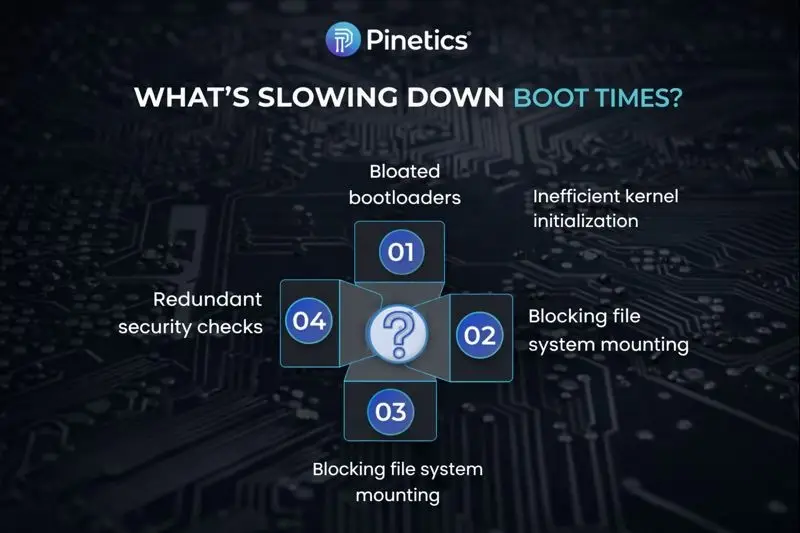
Many embedded systems still experience 8 to 12 second startup times, even when the hardware platform is modern and capable. The cause is rarely hardware limitations. Instead, the core bottlenecks usually lie in firmware architecture and software configuration decisions made early in development.
The most common contributors include:
1) Bloated Bootloaders
Bootloaders such as U-Boot are powerful and flexible, but in many products, they are configured as if every peripheral might eventually be used. This leads to unnecessary initialisation steps long before the kernel is executed. When the bootloader runs extra drivers, diagnostics, or delays, total boot time grows significantly.
2) Inefficient Kernel Initialisation
Generic kernels are designed to support a wide range of hardware platforms and peripheral options. In production systems, most of this functionality is never used. However, the kernel still probes and loads many modules during startup if it is not custom-optimised. Each unused module consumes precious milliseconds that accumulate into seconds.
3) Blocking File System Mounting
Traditional startup processes require full file system mounts to be completed before application logic is executed. In many real-time applications, critical services do not depend on full file system readiness. However, blocking architectures prevent the system from doing useful work until mounting is complete.
4) Redundant or Misconfigured Security Checks
Security layers are essential, especially in regulated domains. But duplicated decryption steps, unnecessary verification cycles, or poorly ordered secure boot processes can add significant delay.
These problems are solvable, but only when boot speed is approached as an engineering problem instead of a necessary inconvenience.
How much faster can an embedded device boot without changing the hardware?
An embedded device can often boot two to three times faster once the boot chain is configured for the product alone. In a worked example a smart IoT security device went from 10.2 seconds to 3.9 seconds with no change to the hardware. Where those seconds sit on your device is a measurement, not a guess.
This worked example shows how much improvement is possible.
A smart IoT security device took 10.2 seconds to boot. For an always-available system responsible for monitoring and response, this delay negatively affected system reliability perception and service-level readiness following power interruptions.
After optimisation, the same system booted in 3.9 seconds, representing a 61 percent improvement without changing the underlying hardware platform.
The key takeaway is simple:
Most embedded systems are capable of booting two to three times faster with informed redesign.
Where do the seconds go in an embedded Linux boot?
The seconds in an embedded Linux boot go to five stages in turn: the boot ROM and first-stage loader, the bootloader, the kernel, the init system bringing up userspace, and the application’s own start. Each stage has its own clock and none reports the others, which is why you measure a device stage by stage before you change anything.
We take a systematic, architecture-first approach focused on firmware streamlining, kernel optimisation, and I/O prioritisation.
The five stages of an embedded Linux boot, and what times each one
| Stage of an embedded Linux boot | What runs | What times it |
|---|---|---|
| Boot ROM and SPL | ROM loads SPL, SPL brings up DRAM | GPIO toggled in early SPL, on a scope |
| Bootloader (U-Boot) | Storage, environment, kernel and device tree load | U-Boot’s bootstage timestamps |
| Kernel | Driver probes, root file system | dmesg timestamps, initcall_debug |
| Init and services | systemd units, networking, daemons | systemd-analyze time, blame |
| Application | Your process reaching ready | Its first log line against the reset |
These readings assume the product runs systemd. On a BusyBox or SysV init the userspace stage is timed from the init scripts’ own logging instead, and every other stage is unchanged.
U-Boot’s bootstage records a timestamp at each step of the bootloader. The kernel’s initcall_debug parameter traces every initcall as it runs, so dmesg shows which driver probe took the time. The systemd-analyze manual describes time as printing the time spent in the kernel, in the initrd and in userspace before the system is up, and blame as listing every unit ordered by how long it took to start. critical-chain then shows which units actually sat on the path to the default target. Read together, these readings put a number on each stage, and the stage with the biggest number is where the work starts.
How do you make the bootloader faster?
A bootloader is made faster by having it do only what the kernel needs: bring up the boot storage, load the kernel and its device tree, then hand over. Every driver, diagnostic and delay beyond that is time. U-Boot’s own documentation goes further with Falcon Mode, which starts the kernel directly from the first-stage loader without a full U-Boot.
Lean Bootloader Architecture
The bootloader should execute only what is essential.
We optimise U-Boot by:
- Removing unnecessary drivers and services
- Implementing parallel peripheral initialisation
- Configuring deterministic boot scripts and direct kernel handoff
Instead of bringing up the entire hardware platform before booting, we activate only the subsystems that matter for immediate operation. This alone can save hundreds of milliseconds to seconds.
The official U-Boot documentation describes Falcon Mode as “introduced to speed up the booting process, allowing to boot a Linux kernel (or whatever image) without a full blown U-Boot”. It suits a fixed product whose boot configuration will not change in the field, and it is as far as trimming a bootloader can go: past that point there is no bootloader left to trim. Its cost is recovery: with no full U-Boot in the fast path there is no console to rescue a unit from, so a fallback route into full U-Boot has to be designed in before Falcon Mode ships.
How do you cut kernel initialisation time?
Kernel initialisation time is cut by building the kernel for the board rather than the platform family: remove the modules the product never loads and build in the drivers it does need. A generic kernel probes for absent hardware and pays for every probe. Interrupt routing and Preempt-RT are tuned for response, not for boot.
Low-Latency Kernel-Level Design
Kernel configuration has one of the largest impacts on startup latency and real-time responsiveness. Our engineering teams customise Linux kernels with:
- Preempt-RT patches for near-real-time determinism
- Optimised interrupt request (IRQ) routing
- The removal of unused kernel modules
- Fine-tuned scheduler configurations
These changes ensure the system not only boots faster but responds faster to sensors, automotive bus input, user interaction, or industrial control signals.
How do you start the application before every file system has mounted?
The application starts before every file system has mounted when the root is split into what the application needs at boot and what can arrive later. A small read-only root holds the application and its libraries, available as soon as the kernel is up; data partitions mount afterwards, and non-urgent services start in parallel, not ahead of the application.
Asynchronous File System Loading
Instead of waiting for the file system to mount completely, we enable phased system availability.
Techniques include:
- Deferred mounting strategies
- Activating only the required drivers on demand
- Read-only root file systems for speed and resilience
This model allows mission-critical applications to execute as soon as essential elements are ready, while non-urgent services initialise in parallel.
The result is a system that “feels instant,” even if background processes continue initialising after use begins.
The four common causes of a slow boot, with the fix for each and the reading that shows the gain
| Cause of a slow boot | The fix | Where the gain shows |
|---|---|---|
| Bloated bootloader | Drivers out, direct kernel handoff | U-Boot bootstage timestamps |
| Generic kernel | Board-specific config, modules removed | dmesg, initcall_debug |
| Blocking file system mount | Read-only root, deferred data mounts | systemd-analyze critical-chain |
| Duplicated security checks | One ordered verification chain | Bootloader and kernel timestamps |
Can you cut boot time if the module vendor supplies the Linux image?
If your module vendor supplies the Linux image as a binary, you can trim userspace services and little else. The bootloader and kernel stages, where the largest cuts usually sit, stay closed to you. Pinetics builds its own NXP i.MX 8M Plus system on module and keeps that boot chain in source control, not as a binary.
The board support package for that module was built in house with the Yocto Project. That work started from a vendor reference BSP and turned it into a package for this module. It carries a machine definition and device tree additions for the board, and U-Boot and kernel recipes pointed at source repositories the team controls, so every change is committed and reviewable. U-Boot and the kernel also build on their own, outside the image build, so either can be rebuilt without rebuilding the whole image. There are two image recipes, a minimal one and a multimedia one, so a product that does not need graphics does not boot a graphics stack. On the carrier board the boot-mode control is part of the schematic, so the module can be told where to boot from without a jumper hunt.
None of that is a boot-time optimisation in itself. It is the precondition for one. A team that receives its Linux as a binary from a module vendor can trim services in userspace and nothing else; the bootloader and kernel stages are closed to it. Our page on the embedded Linux, RTOS and application software layer we build above the firmware sets out where BSP work sits in an engagement, and the Pinetics SOM page has the module itself.
Where does boot performance matter most?
Boot performance matters most where something is waiting on the device: automotive head units and clusters after ignition, industrial controllers recovering from a power loss, field gateways after a remote reset, and medical equipment where a long boot cycle delays care. Sometimes that something is a person; often it is a production line.
Faster startup benefits nearly every embedded sector, but several domains depend on it directly.
Automotive and Transportation Systems
Head units, ADAS controllers, EV chargers, digital clusters, and telematics devices must become available quickly after ignition. Long delays degrade driver confidence and may delay safety features.
Industrial Automation
Controllers recovering from a power loss must return to operational state rapidly. Long reboot times interrupt production lines and increase downtime costs.
IoT and Smart Infrastructure
Edge devices and gateways deployed in the field may experience unstable power or remote resets. Faster recovery equals more reliable service.
Medical Devices
In life-critical equipment, long boot cycles are unacceptable. Rapid availability improves clinical workflows and contributes to patient safety.
In each of these sectors, boot latency connects directly to brand reputation, functional safety, and regulatory perception.
The gateway case is the clearest: a device that is remotely reset must be back on the network before the operator notices, which is also why gateway hardware is chosen with boot in mind, as our post on choosing the right gateway for an IoT system sets out.
What comes next for embedded boot performance?
What comes next for embedded boot performance is a boot sequence that adapts to the product’s use instead of being fixed at build time: AI profiling that reorders startup around the functions used first, containerised firmware components that restart alone rather than rebooting the device, and transactional over-the-air updates that roll back rather than leave a device unbootable.
Reducing boot time today is only part of the story. The next generation of embedded systems will be self-optimising and adaptive.
Emerging techniques include:
AI-Powered Predictive Boot Profiling
AI analyses real usage patterns and automatically reorders system startup sequences based on the functions users access first. The device essentially learns how to boot optimally for its environment.
Containerised Firmware Environments
Containerisation allows firmware components to update or restart in isolation rather than rebooting the entire device. This prevents system downtime during updates and enables modular deployments.
Secure, Rollback-Protected OTA Updates
Next-generation systems maintain speed without compromising resilience. Firmware updates become transactional, secure, and recoverable, ensuring that a failed update does not break the device.
The update path is the part of that list already in reach. Update clients such as RAUC run on the device and manage redundant A/B system images, so a failed update falls back to the image that booted last time. That is what keeps a slow-booting device from becoming a non-booting one, and it is the same discipline our post on debugging battery drain in a wearable’s firmware describes for an update that must not start on a battery too flat to finish it.
Why is boot time a whole-product problem and not a firmware tweak?
Boot time is a whole-product problem because every stage of the boot is decided somewhere else: the SoC and storage chosen at board design set the floor, the partitioning sets how much must mount before the application, thermal and power design decide whether the device can run flat out at start, and the security architecture sets how many checks run.
Boot time is not simply a firmware tweak. It connects to broader system architecture, including:
- SoC selection and board-level design
- Storage type and partitioning strategy
- Thermal and power management design
- Kernel and driver configuration
- Application startup structure
- Security architecture
That is why optimisation efforts are most successful when approached through full-product engineering capability.
Pinetics integrates performance improvement programmes across:
- Embedded Product Development Services
- Hardware Design and Development
- Electronic Product Design Services
By aligning hardware and software teams, we eliminate hidden latency traps across the entire stack rather than treating symptoms in isolation.
Slow boot times are not just an inconvenience; they are an avoidable operational risk. In fast-moving domains such as automotive systems, industrial automation, IoT, and smart medical devices, every second of delay impacts usability, system safety perception, and responsiveness after recovery events.
Most embedded systems today boot far slower than they need to. With the right expertise in firmware architecture, bootloader configuration, kernel design, and edge system strategy, startup times can often be reduced by half or more without replacing existing hardware.
You can buy a faster processor. You cannot buy back the seconds a boot chain spends on hardware that is not there.
Pinetics designs and builds the boot chain as part of the product: the board support package, the bootloader and kernel configuration, and the image recipes. Our embedded product development services, electronic product design services and hardware design and development run across the full product lifecycle, from concept and architecture through optimisation and field deployment. We hold no quality certification of our own, by choice, and work inside our customers’ quality systems instead. The boot chain is delivered as source in the customer’s repository, not as a binary, so the team that inherits it can change it. The team has logged over 100,000 engineering hours across industrial, medical and IoT programmes and is led by engineers with 20+ years in electronic product development.
If slow boot performance is affecting your product, Pinetics can help you diagnose the root cause and design a solution that delivers measurable acceleration without compromising security or stability.