Interface design in medical devices is a matter of clinical clarity because the screen, the buttons and the alarms are where a clinician reads the patient and acts, often tired and under pressure. Interface design for clinical clarity in medical devices means the right information surfaces first, no action is ambiguous and the device never surprises the person holding it.
If you are specifying a medical device with a screen, a button or an alarm now: ask who will use it and in what state; which single piece of information must be visible at all times; which action must never be possible by accident; and which usability standard the usability file will be written against. Those four answers shape the display, the input hardware, the firmware and the regulatory file before a pixel is drawn.
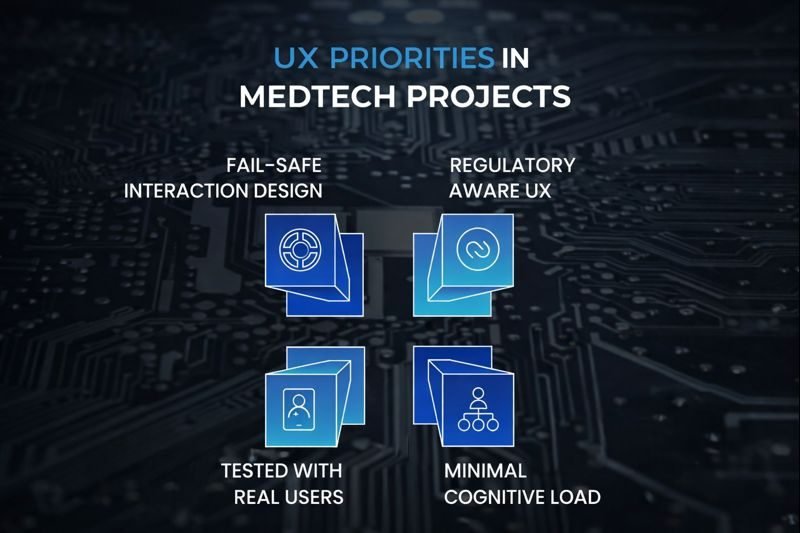
The last of those four questions already has a standard behind it: IEC 62366-1, the IEC standard for applying usability engineering to medical devices. Four priorities shape a clear interface, in this order: minimal cognitive load under pressure, fail-safe interaction design, testing with real clinical users and regulatory-aware UX design.
In medical technology, interface design emphasises clarity over aesthetics. It is about clinical clarity. A well-designed interface can reduce cognitive overload, accelerate decision-making, and prevent critical errors. A poorly designed one can do the opposite, introducing friction at the exact moment when speed, confidence, and accuracy matter most.
In high-stakes environments such as intensive care units, operating rooms, and remote clinics, the interface becomes the frontline of patient safety.
This is why user experience in MedTech is more than a design choice; it is a clinical necessity.
As a product development partner working closely with global MedTech innovators, we see this reality repeatedly: even the most advanced medical devices struggle to deliver impact if their interfaces confuse the people who rely on them under pressure.
Why is UX in MedTech different from consumer UX?
UX in MedTech is different from consumer UX because the medical device user is stressed, mistakes have clinical consequences and workflows change with role, environment and urgency. Regulators examine interface behaviour: IEC 62366-1 specifies the usability engineering process. A nurse in an ICU, a technician in a rural clinic and a lab clinician expect the same: intuitive, predictable and safe.
Designing interfaces for consumer apps and medical devices is fundamentally different.
In MedTech:
- Users operate under stress
- Mistakes can have clinical consequences
- Workflows vary by role, environment, and urgency
- Regulatory scrutiny applies to interface behaviour
- Reliability matters more than visual novelty.
A nurse in an ICU, a technician in a rural clinic, and a clinician in a diagnostic lab do not interact with technology the same way, but all expect it to be intuitive, predictable, and safe.
This makes UX an integral part of end-to-end product development for electronics, not a layer added after hardware and firmware are finalised.
Why does interface design start with system architecture?
Interface design starts with system architecture because what a medical device interface can do is fixed early by hardware capabilities, processing latency, display technology, input mechanisms, power constraints and data integrity requirements. Decide the interface after the hardware and the compromises arrive as reduced responsiveness, cluttered displays or unsafe interaction patterns. Architecture decides what the interface can ever be.
One of the most common mistakes in MedTech product development is treating interface design as a standalone task.
Interface behaviour is tightly coupled with:
- Hardware capabilities
- Processing latency
- Display technology
- Input mechanisms
- Power constraints
- Data integrity requirements
In medical device hardware design, early architectural decisions directly shape what the interface can and cannot do.
If interface requirements are not considered during hardware design, teams often face compromises, such as reduced responsiveness, cluttered displays, or unsafe interaction patterns. Effective MedTech UX starts at the system level.
Those early choices are risk decisions as much as design decisions, which is why ISO 14971 risk management belongs alongside architecture rather than after it.
How do you minimise cognitive load in a clinical interface?
You minimise cognitive load in a clinical interface by giving information a clear hierarchy, prioritising it by urgency, showing each role only what it needs and driving screen transitions from context, so a clinician never has to figure things out. An alarm condition on a medical device must never compete visually with routine status; critical data surfaces without navigation.
In clinical environments, users do not have time to “figure things out.” They need information to surface instantly, clearly, and in the right order.
Designing for Cognitive Simplicity
Minimal cognitive load means:
- Clear information hierarchy
- Prioritisation based on urgency
- Role-aware displays
- Context-driven transitions
For example, an alarm condition should never compete visually with routine status information. Critical data must surface without requiring additional navigation or interpretation.
This approach reduces mental effort and lowers the risk of error, especially during emergencies.
The alarm example is not a matter of taste. Alarm systems in medical electrical equipment have their own collateral standard, IEC 60601-1-8, which “specifies basic safety and essential performance requirements and tests for alarm systems in medical electrical equipment and medical electrical systems”. If your device raises an alarm, ask early whether that standard applies to it, because requirements of that kind are settled while the device is being designed, not in a later restyle.
What is fail-safe interaction design in a medical device?
Fail-safe interaction design in a medical device assumes the user is tired, distracted or working in poor conditions and protects them from unintended actions: colour schemes validated for contrast, one visual language for alerts and warnings, soft locks on critical actions and guided workflows that enforce required steps, backed by responsive input handling, reliable haptic feedback and predictable display refresh.
In MedTech, interfaces must assume that users are tired, distracted, or operating in suboptimal conditions.
Fail-safe interaction design ensures that the system protects users from unintended actions.
Designing to Prevent Errors
Key principles include:
- Colour schemes validated for accessibility and contrast
- Consistent visual language for alerts and warnings
- Guided workflows that enforce required steps
- Soft locks that prevent skipping critical actions
In medical device hardware design, this also requires:
- Responsive input handling
- Reliable tactile or haptic feedback
- Predictable display refresh behaviour
Fail-safe design does not slow users down. It guides them safely through complex tasks.
IEC 62366-1 specifies a process that permits a manufacturer to “assess and mitigate risks associated with correct use and use errors”, which is the same ground fail-safe interaction design covers. Fail-safe also means treating the interface’s own misbehaviour as a defect, not a quirk. In our own work on a connected-health wearable programme, safety-relevant failure modes are treated as defects in their own right: a device raising an SOS alert with no skin contact and no key press, and an alert latency that pushed the notification into the next reporting cycle. Both are interface behaviours the person relying on the device would experience as the device lying to them. If your defect tracker has no category for “the device alerted when it should not have” or “the alert arrived late”, it will not catch them either.
Why test medical device interfaces with real clinical users?
You test medical device interfaces with real clinical users because designers are not the end users, and an interface that looks intuitive in a design review can fail on a ward. Wireframes go in front of nurses, technicians and clinicians. Real usage is observed, assumptions are validated before implementation and the design iterates inside the sprint cycle.
One of the most valuable lessons in MedTech UX is this: designers are not the end users. Interfaces that look intuitive in design reviews often fail in real clinical settings.
Bringing Clinicians into the Process Early
Effective teams:
- Test wireframes with nurses, technicians, and clinicians
- Observe real-world usage scenarios
- Validate assumptions before implementation
- Iterate continuously based on feedback
By baking usability testing into the sprint cycle, teams avoid late-stage surprises that can derail regulatory reviews or adoption.
This approach strengthens end-to-end product development electronics by aligning design, engineering, and real-world use.
Testing with clinicians is also how the usability engineering process gets its evidence. IEC 62366-1 “specifies a process for a manufacturer to analyse, specify, develop and evaluate the usability of a medical device as it relates to safety”, and in practice that process includes use-related risk analysis, a user interface specification and formative evaluation feeding back into the risk file, so each round of clinician testing produces evidence, not only opinions. Where that evidence sits alongside IEC 62304 and ISO 14971 in a regulated software programme is set out on our page on software development for regulated medical devices.
What does regulatory-aware UX design require?
Regulatory-aware UX design treats the medical device interface as a regulated artefact. IEC 62366-1 specifies a process for a manufacturer to analyse, specify, develop and evaluate usability as it relates to safety, so the process is documented, decisions traceable, every risk mapped to a mitigation, logs and alerts auditable and interface behaviour consistent across versions. Intuitive must be provable.
Unlike consumer interfaces, medical device interfaces are regulated as artefacts. Standards such as IEC 62366 require manufacturers to demonstrate that usability risks have been identified, mitigated, and validated.
UX as a Compliance Requirement
Regulatory-aware UX design includes:
- Documented usability engineering processes
- Traceable design decisions
- Clear mapping between risks and mitigations
- Auditable logs and alerts
- Interface behaviour consistency across versions
This means UX decisions must be deliberate, documented, and defensible.
In MedTech, “it feels intuitive” is not enough. You must be able to prove it.
The standards a medical device interface is written against, what each governs on the interface and where to find it
| Standard | What it governs on the interface | Source |
|---|---|---|
| IEC 62366-1:2015+AMD1:2020 | Usability engineering process; correct use and use errors | IEC 62366-1 page |
| IEC 60601-1-8:2006+AMD1:2012+AMD2:2020 | Basic safety and essential performance for alarm systems | IEC 60601-1-8 page |
| ISO 14971:2019 | Risk management the usability file feeds into | ISO 14971 page |
| IEC 62304:2006+A1:2015 | Life cycle of the software behind the screen | IEC 62304 page |
Pinetics holds no certification of its own and works inside its customers’ quality systems, so the usability file, the risk file and the software life cycle records that IEC 62366-1, ISO 14971 and IEC 62304 call for are produced in the customer’s design records, not in ours. The engineering work underneath those records is keeping the interface’s behaviour the same as its specification on every hardware revision, so the evidence you file does not go stale when a component changes.
How do hardware constraints shape the interface experience?
Hardware constraints shape the interface experience because processor speed, memory, display resolution, input latency and power management decide how responsive and reliable a medical device interface feels. A lagging display, a delayed button response or an alert that behaves inconsistently erodes clinical trust, which is why interface requirements inform the hardware architecture rather than compete with it afterwards.
Interface performance is inseparable from hardware performance.
In medical device hardware design, factors such as:
- Processor speed
- Memory availability
- Display resolution
- Input latency
- Power management
directly affect how responsive and reliable an interface feels.
A lagging display, delayed input response, or inconsistent alert behaviour erodes trust, especially in clinical environments.
This is why interface requirements must inform, not compete with, hardware architecture.
UX Is About Trust, Not Just Usability
In medical devices, trust is built through predictability.
Clinicians trust devices that:
- Behave consistently
- Respond instantly
- Present information clearly
- Never surprise them
A good interface disappears into the workflow. It does not demand attention; it supports action.
This is what we mean when we say great MedTech UX is intuitive, safe, and invisible under pressure.
The hardware factors behind a medical device interface, what the clinician sees when each is wrong and where it is decided
| Hardware factor | What the clinician sees when it is wrong | Decided at |
|---|---|---|
| Processor speed | Screens that lag behind the input | Architecture, part selection |
| Memory availability | Features dropped late or screens simplified | Architecture |
| Display resolution | Waveforms and small text that cannot be read | Display selection |
| Input latency | A button that seems not to have registered | Firmware and input hardware |
| Power management | A display that dims or sleeps mid-task | Power architecture and firmware |
The firmware that turns a key press into a change on screen is medical device software, and IEC 62304 sets out the life cycle processes for it. That is the difference between an input latency that is specified and verified and one that is tuned at the end. Two of these factors are covered in more depth elsewhere on this blog. Power management decisions are the subject of our post on how power optimisation changes MedTech devices. A display that flickers or a touch that misfires under interference is an electromagnetic problem before it is a UX one, covered in our post on EMI and EMC design for MedTech devices.
How do you design a medical interface for care under constraints?
You design a medical interface for care under constraints by assuming limited time, variable lighting, gloves and protective equipment, fatigue, stress and inconsistent infrastructure, then asking three questions of every screen: what information is truly essential, which actions must never be ambiguous and what happens when something goes wrong. Those answers make UX a clinical responsibility.
Medical environments are full of constraints:
- Limited time
- Variable lighting
- Gloves and protective equipment
- Fatigue and stress
- Inconsistent infrastructure
Designing under these constraints requires humility and discipline.
It requires teams to ask:
- What information is truly essential?
- What actions must never be ambiguous?
- What happens when something goes wrong?
These questions elevate UX from a design task to a clinical responsibility.
Those three questions are where use-related risk analysis starts, and the IEC 62366-1 process carries it through to a user interface specification.
Why is UX a differentiator in global MedTech?
UX is a differentiator in global MedTech because a medical device deployed across regions meets varying skill levels, different clinical workflows, language and cultural differences and diverse infrastructure. The interface is where a device either absorbs those differences or is defeated by them. A robust UX strategy makes the device more adaptable, easier to train on and faster to adopt.
As MedTech products scale globally, interface quality becomes a competitive advantage.
Devices deployed across regions must accommodate:
- Varying skill levels
- Different clinical workflows
- Language and cultural differences
- Diverse infrastructure conditions
A robust UX strategy makes devices more adaptable, easier to train on, and faster to adopt.
In global markets, usability is not optional; it determines outcomes.
The documents behind the interface are international rather than national: IEC 62366-1 for usability engineering and IEC 60601-1-8 for alarm systems are both published by the IEC. What changes from market to market is the clinician, the workflow and the training, which is what the interface has to absorb.
Why is UX a system, not a screen?
UX is a system, not a screen, because a medical device interface is produced jointly by hardware design, firmware behaviour, data visualisation, interaction patterns and regulatory documentation. Treat it as a system-level discipline across all five and the result is not just a better interface but a better product; treat it as a screen and the other four undo it.
The most successful medical devices treat UX as a system-level discipline.
It spans:
- Hardware design
- Firmware behaviour
- Data visualisation
- Interaction patterns
- Regulatory documentation
When UX is integrated into end-to-end product development electronics, the result is not just a better interface; it is a better product.
Regulatory documentation is written out of the same design decisions as the rest: usability under IEC 62366-1, risk under ISO 14971 and the software life cycle under IEC 62304.
What makes a medical device interface clear, safe and dependable?
A medical device interface is clear, safe and dependable when it is designed as part of the system, with usability, hardware, firmware and regulatory requirements aligned from the first architecture review, tested with the clinicians who will use it and documented so that intuitive can be proved. It is not about looking good; it is about clinical clarity.
In medical technology, interface design is not about making devices look good. It is about ensuring they are clear, safe, and dependable when it matters most.
Great UX in MedTech reduces errors, builds trust, and improves outcomes, especially when embedded into thoughtful medical device hardware design and holistic end-to-end product development electronics.
At Pinetics, we approach medical device development with this philosophy. We design interfaces as part of the system, not as an afterthought, aligning usability, hardware, firmware and regulatory requirements into a single, cohesive product strategy, from the display and input hardware chosen at architecture, through the firmware that makes a button register and an alarm sound on time, to the usability evidence that lands in your design records. That work rests on 100,000+ engineering hours and a leadership team with 20+ years of experience, and it runs inside the customer’s quality system rather than under a certification of our own. If your device has a screen that clinicians will read under pressure and nobody has yet written down what must never be ambiguous on it, that is the first conversation to have.
We design with users in mind. We design care under constraints. And that is what ultimately elevates both experience and clinical outcomes.
Navin Goyal, Co-Founder and Global CEO, Pinetics. BE Electronics, Dr D. Y. Patil College of Engineering; MBA (Finance and Marketing), Indira School of Management Studies. 20+ years of experience. LinkedIn